As everyone knows, TikTok isn't accessible in mainland China. If you want to use TikTok, you need a proxy and you have to remove your SIM card. The proxy part is manageable, but the SIM removal requirement is honestly super annoying!
So how do we get around this? Follow along step by step, and you'll be able to use TikTok on your iPhone without removing the SIM card. Let's walk through this together!
Requirements:
- A US region Apple ID
- A Windows PC
- iTunes for Windows -- the version must be no higher than 12.6.5.3, since only versions before this have the App Store which allows us to capture IPA files https://www.theiphonewiki.com/wiki/ITunes(在新标签页中打开) (opens in a new tab)
- i4Tools (Aisi Helper)
- A USB cable
- A packet capture tool https://pan.baidu.com/share/init?surl=U95g7PzFXpp1OUS_5WdAzA&pwd=code(在新标签页中打开) (opens in a new tab)
- QuantumultX (the legit paid version -- shared accounts can't use the rewrite feature)
- A proxy node
- Your US Apple ID needs a foreign credit card linked or a redemption code
Looks like a lot of hassle, right? Yeah, it is! But if you want full access to all features, including the ability to post videos without getting throttled, this is the only way.
- Download method: Search for TikTok in the US/Japan/Taiwan region App Store and download it (Hong Kong region has been discontinued).
- Supported features:
- Region switching
- Watch videos
- Post videos
- Like
- Comment
- TikTok Live
1. Download QuantumultX
- QuantumultX is available on the Apple App Store -- just buy it directly. Don't hesitate, this app unlocks a ton of awesome features like:
- Ad-free Spotify
- Ad-free YouTube
- Play region-locked songs on NetEase Cloud Music
- TikTok unlock
- Script execution
- JD.com auto check-in
- And much more...
Only the version with the following icon supports the rewrite feature (the legit paid version):
- If you're stuck on this step, feel free to reach out and I can recommend some redemption codes or foreign credit card options. Alternatively, you can follow this guide to apply for a OneKey card that lets you top up with cryptocurrency.
- This card can be reused for many other things down the road
- It's a bit involved though, so I'd recommend just buying a redemption code -- the price difference isn't huge
2. Download the QuantumultX Configuration
- Download this config file into your app: QuantumultX Config(在新标签页中打开) (opens in a new tab)
3. Customize QuantumultX to Your Preferences
- By now you should have all your config files and proxy lines set up, so you can do some personal tweaking
- Route different connections through specific rules based on your needs
- Adding rules is pretty straightforward -- I usually add them via Host-keyword (meaning any website with a matching keyword in its name gets routed through a specific proxy line, which is super convenient)
- There are plenty of tutorials online for this, so I won't go into detail here
Note: Since TikTok updates frequently, the unlock scripts may need updating. I recommend following the relevant GitHub pages for the latest info.
4. Use the Packet Capture Tool to Grab the IPA File
We need a packet capture tool to grab the IPA file from our own US Apple ID in iTunes version 12.6.5.3 or earlier.
Important notes:
- The download must be from your own account or one you can log into -- otherwise it's useless
- The TikTok version must be 21.1.0 -- download it from the version history
- You can update TikTok afterwards, but make sure you download the historical version first
Software Download Links
Download link: iOS Any Version APP Downloader v5.1(在新标签页中打开) (opens in a new tab)
Password: code
iTunes v12.6.5.3 (the last version with the App Store)
- Official direct links: 64-bit Download(在新标签页中打开) (opens in a new tab) 32-bit Download(在新标签页中打开) (opens in a new tab)
Method: Direct Search
- Search for TikTok and double-click to select it.
- Double-click to choose the version you want to download.
- Download it in iTunes.
FAQ
Q: Can't log into my iTunes account
- Close the capture tool first, then log into iTunes.
- Once logged in, open the capture tool again.
Q: Can't authorize the computer in iTunes -- it keeps looping
- Close the capture tool, then authorize. It should work.
Q: Can't find the app's version history? (This method works 100% of the time)
- Don't intercept yet -- download the app in the iTunes Store first. Wait for the download to complete.
- In the capture tool, go to "Install Management" and find the corresponding IPA package. Right-click and select "Find Version ID."
- This will list all historical version IDs, sorted from newest to oldest.
- PS: There's currently no API to look up version numbers from version IDs, so you'll have to download and check manually.
Q: iTunes is stuck on "Downloading..."
- Cancel the download in iTunes first.
- Stop interception in the capture tool, then click "Resume Download" in iTunes.
Q: The downloaded app crashes on launch after installing on my phone
- Uninstall the app from your phone first.
- Log into the App Store with the account that downloaded the app, and download any random app (don't uninstall it).
- Use i4Tools to reinstall. (If it still crashes, try an overwrite install.)
Q: After importing the spoofed old version app, iTunes doesn't detect an update
- On the iTunes update list page, press F5.
- If that doesn't work, delete all files from the list (keep the files themselves), then click the "Check for Updates" button in the bottom right.
Q: How to capture a "discontinued" app? (This method is no longer working)
- Stop interception and download the latest version of the app.
- In the capture tool, switch to "Install Management," right-click the app, and select "Spoof Old Version."
- Double-click the "*_spoofed.ipa" file (or right-click to open in folder), drag the app to the iTunes library, replace it, check for updates -- the app should now show as "Update Available."
- Start interception, update the app in iTunes, and the target version should download normally.
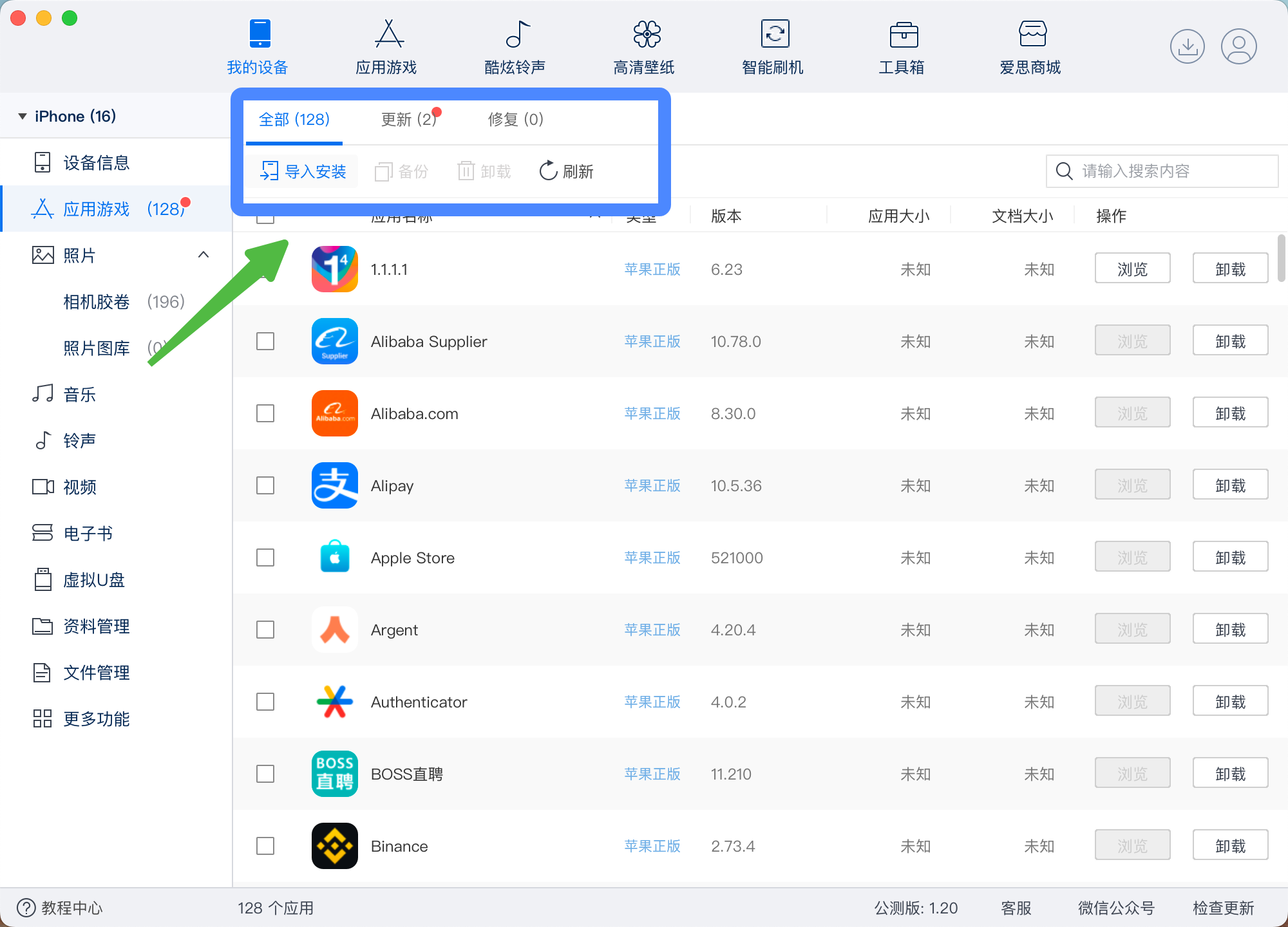
5. Install the IPA File Using i4Tools
- Download i4Tools from the official website
- Connect your phone with a USB cable and tap "Trust"
- Go to "My Device"
- Find "Apps & Games" and click to install the IPA file
At this point, you've successfully installed TikTok on your phone!
Remember to run QuantumultX in rule mode, and make sure your proxy lines are properly configured before opening TikTok -- otherwise you'll have to reinstall everything!!!
Now you can basically use TikTok without removing your SIM card!!